What is ZPL? Zebra Programming Language Explained
ZPLCraftUpdated August 17, 2026
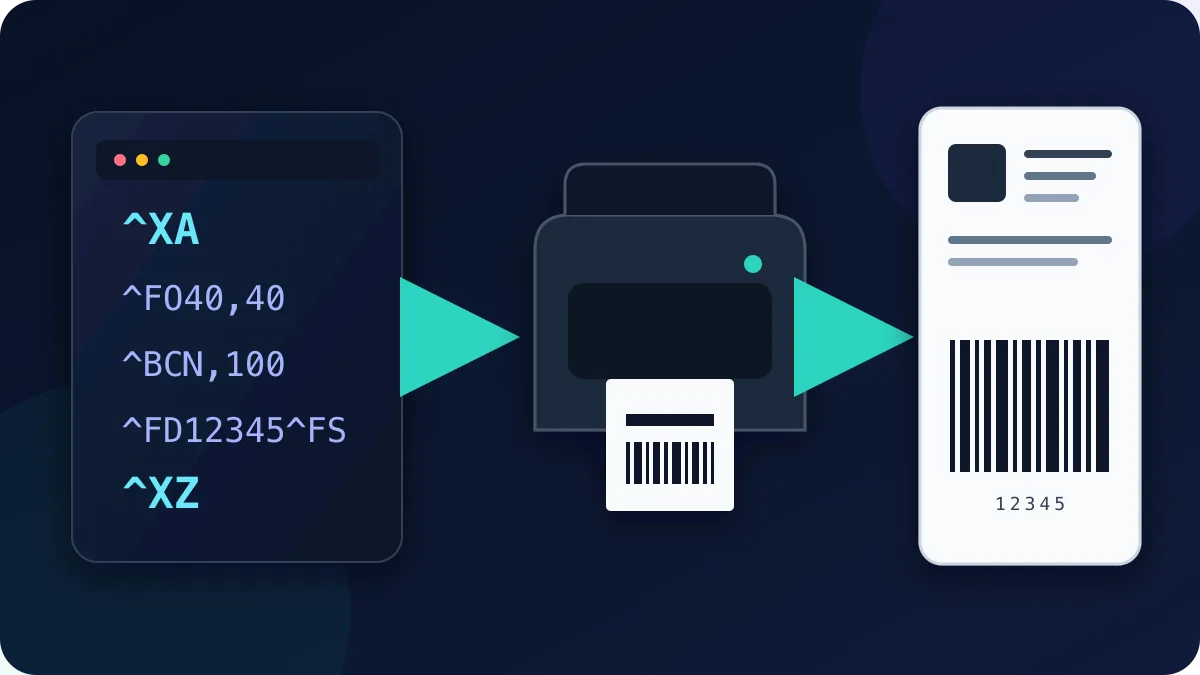
ZPL (Zebra Programming Language) is a command language used by compatible thermal printers to describe labels. Instead of receiving a finished page image, a ZPL printer receives plain-text commands such as “put this text here, draw this barcode there, print one copy,” interprets them and renders the label using its configured printhead resolution.
ZPL uses compact text commands that applications such as ERP systems, scripts and browser tools can generate. Printer support is model- and configuration-specific: Zebra documents ZPL II support in individual model specifications, and some printers from other manufacturers provide a documented ZPL-compatible emulation mode.
What a ZPL label looks like
A ZPL document is a sequence of commands, each starting with a caret (^). Every label is wrapped between ^XA (start format) and ^XZ (end format). Here is a complete, working label:
^XA
^CF0,40
^FO50,50^FDHELLO WORLD^FS
^FO50,110^GB700,4,4^FS
^BY3,2,100
^FO150,150^BCN,100,Y,N,N^FD12345678^FS
^XZ
Reading it line by line:
^XA…^XZ— open and close the label format. Everything in between describes one label.^CF0,40— set the default font to the scalable font 0 at 40 dots tall.^FO50,50— Field Origin: position the next field 50 dots from the left and 50 dots from the top.^FDHELLO WORLD^FS— Field Data followed by Field Separator: the actual content of the field.^GB700,4,4— draw a Graphic Box 700 dots wide and 4 dots tall — here used as a horizontal rule.^BY3,2,100then^BCN,100,Y,N,N— set barcode defaults (module width, ratio, height), then render a Code 128 barcode with the data12345678and a human-readable line underneath.
Dots, not pixels: understanding DPI
Every coordinate and size in ZPL is measured in printer dots, and the physical size of a dot depends on the printhead resolution. The common resolutions are 203 dpi (8 dots/mm), 300 dpi (12 dots/mm) and 600 dpi (24 dots/mm). On a 203 dpi printer a 4 × 6 inch shipping label is 812 × 1218 dots; on a 300 dpi printer the same label is 1200 × 1800 dots. ZPL written for one resolution prints smaller or larger on another, making a DPI mismatch a common cause of “my label looks wrong on the new printer” — sizes must be scaled to the target DPI.
ZPL vs. EPL vs. driver printing
You may also run into EPL (Eltron Programming Language), used by some older or explicitly compatible printers. ZPL and EPL support varies by model and firmware, so check the printer manufacturer’s documentation before choosing a language. The alternative to raw printer-language output is driver-based printing, where a Windows or CUPS driver prepares a rendered page for the configured printer. Raw ZPL can provide direct coordinate control and compact text payloads, while driver-based printing may be more suitable when the device or operating system does not expose a compatible raw-ZPL path.
How to write — or generate — ZPL
For a one-off label, writing ZPL by hand with a command reference open is perfectly doable: the language is small, and a handful of commands (^FO, ^FD, ^A, ^BC, ^GB) covers most real labels. The pain starts when you need to iterate on a layout — every nudge means editing dot coordinates, re-sending the file and wasting label stock.
That is the problem visual designers solve. ZPLCraft gives you a true-to-size canvas where you position text, barcodes, lines and boxes and generate ZPL scaled for the selected printer DPI. Barcode data, dimensions and quiet zones still need to meet the chosen symbology’s requirements, and printed output should be verified with the target printer and scanner. You can export the code into a system that already sends ZPL, or use WebUSB printing from the browser when the browser, operating system and printer expose a compatible, claimable interface.
Frequently asked basics
Is ZPL free to use?
Zebra publishes the ZPL II Programming Guide for public reference, and you can write ZPL commands with a text editor. Printer software, fonts, firmware and trademarks may have their own license terms.
What file extension does ZPL use?
There is no required extension — ZPL is plain text. You will see .zpl, .txt and .prn in the wild; printers do not care, they just consume the byte stream.
Can I preview ZPL without a printer?
Previews and ZPL, PNG and PDF downloads are prepared locally in your browser. Label content is not uploaded for rendering.
Which printers are ZPL-compatible?
Compatibility is model- and configuration-specific. Check the manufacturer’s specifications for ZPL or ZPL II support or a documented emulation mode, confirm the target DPI and required features, and test the exact output path. USB or TCP port 9100 connectivity alone does not prove that a printer accepts ZPL. Compatibility and recommendation