ZPL Fonts: ^A Command, Built-in Fonts & Examples
ZPLCraftUpdated September 30, 2026
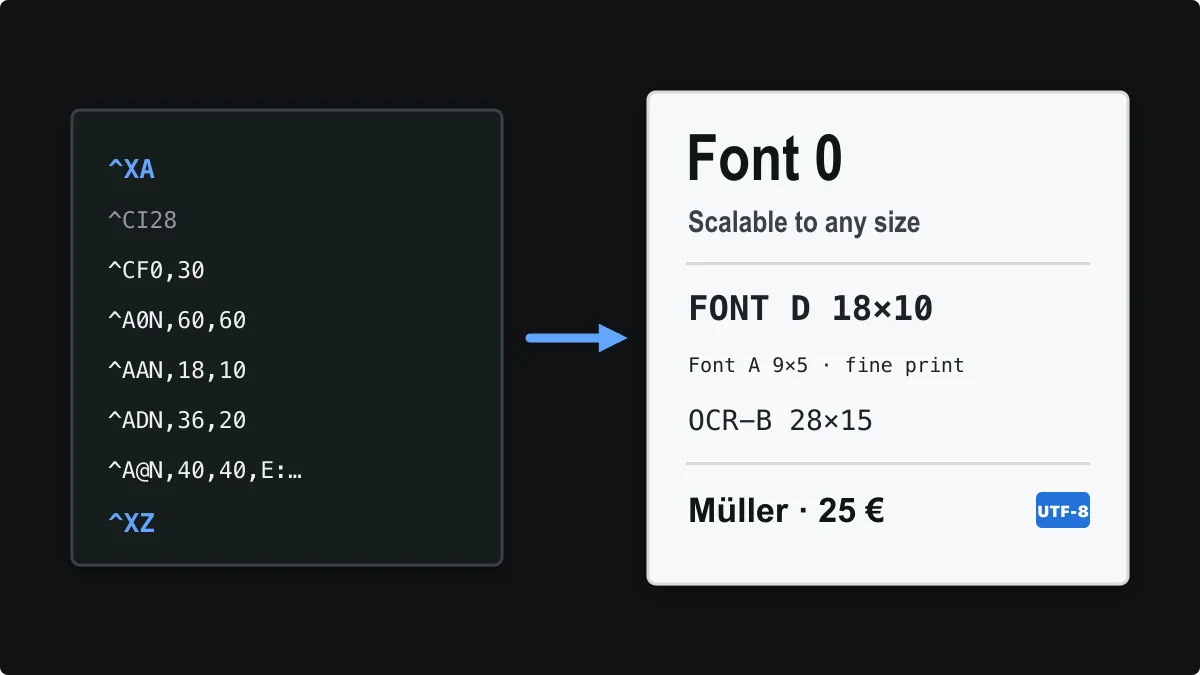
Every piece of text on a Zebra label is drawn with a printer font chosen by the ^A command (or the default set by ^CF). Getting fonts right is mostly about three things: picking the right built-in font, sizing it in printer dots rather than points, and making sure the printer can draw the characters you send.
This guide covers the ^A syntax, every built-in font with its native size, how sizes change between 203 and 300 dpi, international characters with ^CI28, and custom TrueType fonts stored on the printer. You can open the specimen below in the free ZPL viewer and change it live.
The ^A font command
A field uses the font set immediately before its field data. The command takes a font name, an orientation and a height and width in dots:
^Afo,h,w- f — the font name: 0 for the scalable font, A–H and P–V for bitmap fonts, or a single-character alias assigned with ^CW.
- o — orientation: N normal, R rotated 90° clockwise, I inverted 180°, B read from bottom up (270°).
- h — character height in dots.
- w — character width in dots. Leave it out and the printer derives it from the height.
A common production pattern is to set a default once with ^CF and override it with ^A only where a field needs a different size:
^XA
^CF0,30
^FO40,40^FDDefault font 0 at 30 dots^FS
^FO40,90^A0N,60,60^FDLarger heading^FS
^FO40,170^A0B,40,40^FDRotated 270^FS
^XZ
Built-in ZPL fonts and their sizes
Zebra printers ship with one scalable outline font and a set of fixed bitmap fonts. Bitmap fonts have a native character cell, measured in dots at 203 dpi (8 dots/mm). They can only be magnified in whole multiples of that cell, so a requested height snaps to the nearest multiple.
| Font | Type | Native cell (H × W dots) | Notes |
|---|---|---|---|
0 | Scalable | 15 × 12 | CG Triumvirate Bold Condensed. Any size; the usual choice for labels. |
A | Bitmap | 9 × 5 | Small text such as fine print. Upper and lower case. |
B | Bitmap | 11 × 7 | Upper case only. |
C, D | Bitmap | 18 × 10 | C and D are the same size. Upper and lower case. |
E | Bitmap | 28 × 15 | OCR-B. 42 × 20 dots on 300 dpi printers. |
F | Bitmap | 26 × 13 | Upper and lower case. |
G | Bitmap | 60 × 40 | Large headline text. |
H | Bitmap | 21 × 13 | OCR-A, upper case only. 34 × 22 dots on 300 dpi printers. |
P–V | Bitmap | 20 × 18 … 80 × 71 | Fixed sizes from 20 × 18 up to 80 × 71 dots, available on some printer models. |
Font 0 is already a bold condensed face, which is why most shipping and warehouse labels use it for everything from addresses to large sort codes.
ZPL font examples
This label prints one line in each common built-in font, plus a rotated field. It is written for a 4-inch-wide label at 203 dpi.
^XA
^PW812
^LL620
^CI28
^FO40,30^A0N,50,50^FDFont 0 (scalable) at 50 dots^FS
^FO40,100^A0N,30,30^FDFont 0 at 30 dots^FS
^FO40,150^AAN,18,10^FDFont A 9x5, magnified x2^FS
^FO40,190^ABN,22,14^FDFONT B 11X7 X2^FS
^FO40,230^ADN,36,20^FDFont D 18x10 x2^FS
^FO40,290^AEN,28,15^FDFont E OCR-B^FS
^FO40,340^AFN,26,13^FDFont F 26x13^FS
^FO40,390^AGN,60,40^FDG 60x40^FS
^FO40,470^AHN,21,13^FDFONT H OCR-A^FS
^FO740,30^A0R,30,30^FDRotated with R^FS
^XZ
Open this font specimen in the ZPL viewer
In the viewer you can change heights and widths and watch bitmap fonts jump between whole-number magnifications while font 0 scales smoothly.
Font size in dots: 203 vs 300 dpi
ZPL measures everything in printer dots, not points or millimetres. A 203 dpi printer has 8 dots per millimetre; a 300 dpi printer has 12. The same ^A0N,40,40 command therefore prints text about 5 mm tall on a 203 dpi printer but only about 3.4 mm tall on a 300 dpi printer.
To convert a point size to dots, multiply by the printer resolution and divide by 72. A 12 pt line is about 34 dots at 203 dpi and 50 dots at 300 dpi. When you move a label between printer resolutions, scale every font height, width and position by the same ratio (300 ÷ 203 ≈ 1.48).
Setting a default font with ^CF
The ^CF command changes the default font for every following field that does not set its own ^A. ^CF0,30 makes font 0 at 30 dots the default; ^CFA,18 switches to bitmap font A at double size. Setting the default at the top of the format keeps each field shorter and makes the label easier to maintain.
Accents, Unicode and international characters
By default many printers interpret field data with a legacy single-byte code page, so accented letters, currency symbols or non-Latin scripts can print as the wrong characters. Add ^CI28 near the start of the format to tell the printer that field data is UTF-8.
^XA
^CI28
^FO40,40^A0N,40,40^FDMüller GmbH — 25 €^FS
^XZ
The encoding only solves half the problem: the selected font must also contain the glyphs. Built-in font 0 covers Western European letters, but Chinese, Japanese, Korean, Arabic or Cyrillic text usually needs a Unicode TrueType font installed on the printer. Where a character cannot be typed safely, ^FH lets you write it as hexadecimal escapes inside ^FD.
Custom TrueType fonts: ^A@ and ^CW
Most current Zebra printers can store TrueType or OpenType fonts in their flash memory (usually drive E:). Upload the font with Zebra Setup Utilities or a ~DY download command, then call it by file name with ^A@, for example ^A@N,40,40,E:ARIAL.TTF.
If a label uses the same font many times, ^CW assigns it a single-letter alias so you can write ^AZ instead of the full path. A downloaded font only exists on the printer it was sent to, so every printer in a fleet needs the same font file before the label will print identically.
^XA
^CWZ,E:ARIAL.TTF
^FO40,40^AZN,40,40^FDArial via alias Z^FS
^FO40,100^A@N,40,40,E:ARIAL.TTF^FDArial by file name^FS
^XZ
How fonts render in a ZPL preview
Zebra’s printer fonts are proprietary, so no online viewer can reproduce them pixel for pixel. The ZPLCraft viewer uses licensed substitutes with the same cell sizes and metrics for the built-in fonts and flags anything it cannot draw. Use the preview for layout and fit, then confirm spacing and line breaks with one test print.
ZPL font questions
What is the default font in ZPL?
Unless the format sets one with ^CF or ^A, printers default to bitmap font A. In practice almost every label sets font 0, the scalable CG Triumvirate Bold Condensed font, explicitly.
How do I make text bold in ZPL?
ZPL has no bold attribute. Font 0 is already bold condensed; to make text heavier, increase its width relative to the height, or install a bold TrueType font on the printer and select it with ^A@.
Why does my text print at a different size than expected?
Either the label was written for a different printer resolution, or a bitmap font snapped to the nearest whole-number magnification. Use font 0 when you need exact sizes, and scale dot values when switching between 203 and 300 dpi.
Why do accented or non-Latin characters print incorrectly?
Add ^CI28 so the printer reads field data as UTF-8, and make sure the selected font contains the characters. Scripts such as Chinese or Arabic usually need a Unicode TrueType font stored on the printer.